
How to Unblur Your Image in Seconds
How to Unblur Your Image in Seconds
We have all been there. You capture what you think is the perfect moment—a fleeting smile, a stunning landscape, or a vital product shot—only to realize later that the photo is blurry. In the past, a blurry photo was a deleted photo. But today, thanks to advanced AI technology, you can salvage those memories.
If you are wondering how to unblur your image effectively, you have come to the right place. In this guide, we will show you how to turn low-quality, out-of-focus pictures into sharp, high-definition images using Unblur Image by Haimeta.
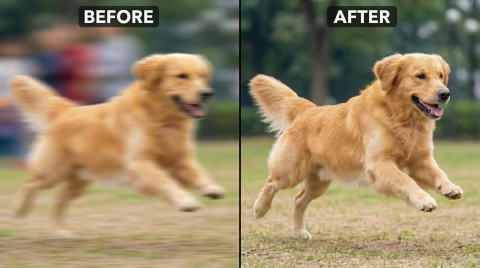
Why Do Images Get Blurry?
Before fixing the problem, it helps to understand why it happens. Knowing the root cause can help you choose the right tool to Unblur Image artifacts. The most common culprits include:
- Motion Blur: The subject moved, or your hand wasn't steady while taking the photo.
- Out of Focus: The camera lens focused on the background instead of the subject.
- Low Light: The camera used a slow shutter speed to let in light, causing blur.
- Low Resolution: The image was resized or compressed, leading to pixelation.
Regardless of the cause, the solution is easier than you think. You don't need expensive software like Photoshop or professional editing skills. You just need the right AI tool.
The Best Tool to Unblur Images: UNBLUR IMAGE
When you search for "how to unblur your image," you want a solution that is fast, easy, and effective. This is where UNBLUR IMAGE by Unblur Image shines.
Hosted at Unblur Image by Haimeta, UBLUR IMAGE utilizes state-of-the-art Artificial Intelligence to analyze the pixels in your blurry photo. It intelligently reconstructs lost details, sharpens edges, and removes noise, delivering a crystal-clear result in seconds.
Step-by-Step: How to Unblur Your Image with UNBLUR IMAGE
Ready to fix your photos? Follow this simple step-by-step guide to unblur image files instantly.
Step 1: Visit the Website
Go to Unblur Image on your computer or mobile device. Our tool is web-based, meaning you don't need to download any heavy software or apps.
Step 2: Upload Your Blurry Photo
Click on the "Upload" button or simply drag and drop your image into the designated area. We support mostly common formats like JPG and PNG.
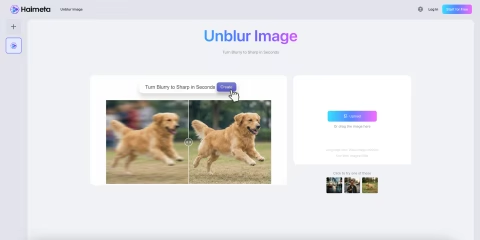
Step 3: Let AI Do the Work
Once uploaded, the AI engine will automatically detect the blur type. It works to de-blur, sharpen, and upscale the resolution simultaneously. This process usually takes just a few seconds.
Step 4: Preview and Download
Compare the result with the original. Once you are satisfied with the sharpness, download the enhanced image to your device instantly.
Why Use AI to Unblur Images?
Manual editing is tedious and requires skill. Using an AI tool like UNBLUR IMAGE to unblur your image offers several distinct advantages:
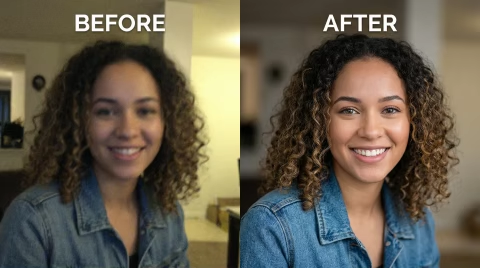
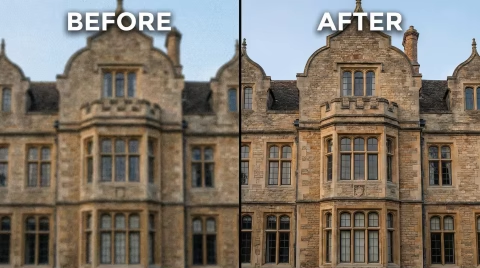
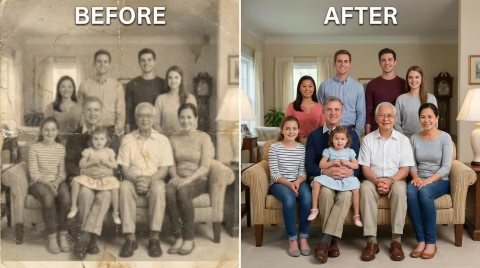
1. Speed: What used to take hours of manual retouching now takes seconds. 2. Precision: AI can distinguish between noise and detail better than the human eye. 3. Restoration: It doesn't just sharpen; it can actually restore facial features in old, grainy family photos.
Tips to Prevent Blurry Photos in the Future
While UNBLUR IMAGE is a powerful tool to fix mistakes, capturing a clear photo initially is always best. Here are three quick tips to avoid the blur:
- Stabilize Your Camera: Use a tripod or rest your phone on a stable surface to avoid camera shake.
- Tap to Focus: On mobile phones, always tap the screen on your subject to ensure the focus is locked before shooting.
- Clean Your Lens: A smudge or fingerprint on your lens is a common, often overlooked reason for hazy photos.
Conclusion
Don't let a blurry photo ruin a perfect memory. Whether you are a photographer, an e-commerce seller, or just someone who loves sharing life on social media, knowing how to unblur your image is a game-changer.
With UNBLUR IMAGE, you have a powerful, free, and instant solution at your fingertips.
Ready to sharpen your world? Visit www.haimeta.com now and start transforming your photos today!