
The Ultimate Comparison: Traditional Editing vs. AI for Product Change Background
The Ultimate Comparison: Traditional Editing vs. AI for Product Change Background
In the high-stakes world of e-commerce, your product image is your storefront. It is the first point of contact between your brand and a potential customer. We have all heard the saying that a picture is worth a thousand words, but in online retail, a picture is often worth a thousand dollars—or more. One of the most critical aspects of optimizing these images is the ability to product change background.
Changing the background of a product photo can completely shift its context, turning a boring studio shot into a lifestyle masterpiece that drives engagement and sales. However, the method you choose to achieve this makes all the difference. Today, we are going to dive deep into a friendly comparison between the old-school manual methods and the revolutionary new AI-powered solutions, specifically focusing on the Product Change Background Tool created by Haimeta.
The Old Way: The Struggles of Manual Photoshop Editing
For decades, if you wanted to change the background of a product image, you had two choices: organize an expensive location photoshoot or spend hours inside photo editing software like Photoshop. Let’s break down why this traditional approach is becoming obsolete for fast-paced businesses.
1. The Time Drain of the Pen Tool
If you have ever used the Pen Tool to cut out a complex object—say, a bicycle with spokes or a fluffy sweater—you know the pain. Creating a precise clipping path is tedious. A skilled retoucher might spend 20 to 30 minutes just isolating the subject before even thinking about the new background.
2. The Lighting Mismatch Nightmare
This is where most manual edits fail. You cut out a bottle of perfume photographed in a flat-lit studio and paste it onto a background of a sunset beach. Immediately, it looks fake. Why? Because the light source on the bottle doesn't match the light source of the beach. The shadows fall in the wrong direction, or worse, there are no shadows at all, making the product look like it is floating in mid-air. Fixing this requires advanced knowledge of shading, perspective, and color grading.
3. High Costs and Scalability Issues
Hiring professional graphic designers to manually process hundreds of SKUs is expensive. If you launch a new collection with 50 items, and each item needs 5 different background variations for social media, that is 250 images. Doing this manually is a logistical bottleneck that slows down your time-to-market.
The New Way: AI-Powered Background Replacement
Enter the era of Artificial Intelligence. Tools like the Product Change Background Tool created by Haimeta have fundamentally changed the workflow. It is no longer about "cutting and pasting"; it is about "merging and generating."
How Haimeta Changes the Game
Haimeta utilizes advanced generative AI models specifically tuned for product photography. Unlike basic background removers that just leave you with a transparent PNG, Haimeta’s tool understands the scene.
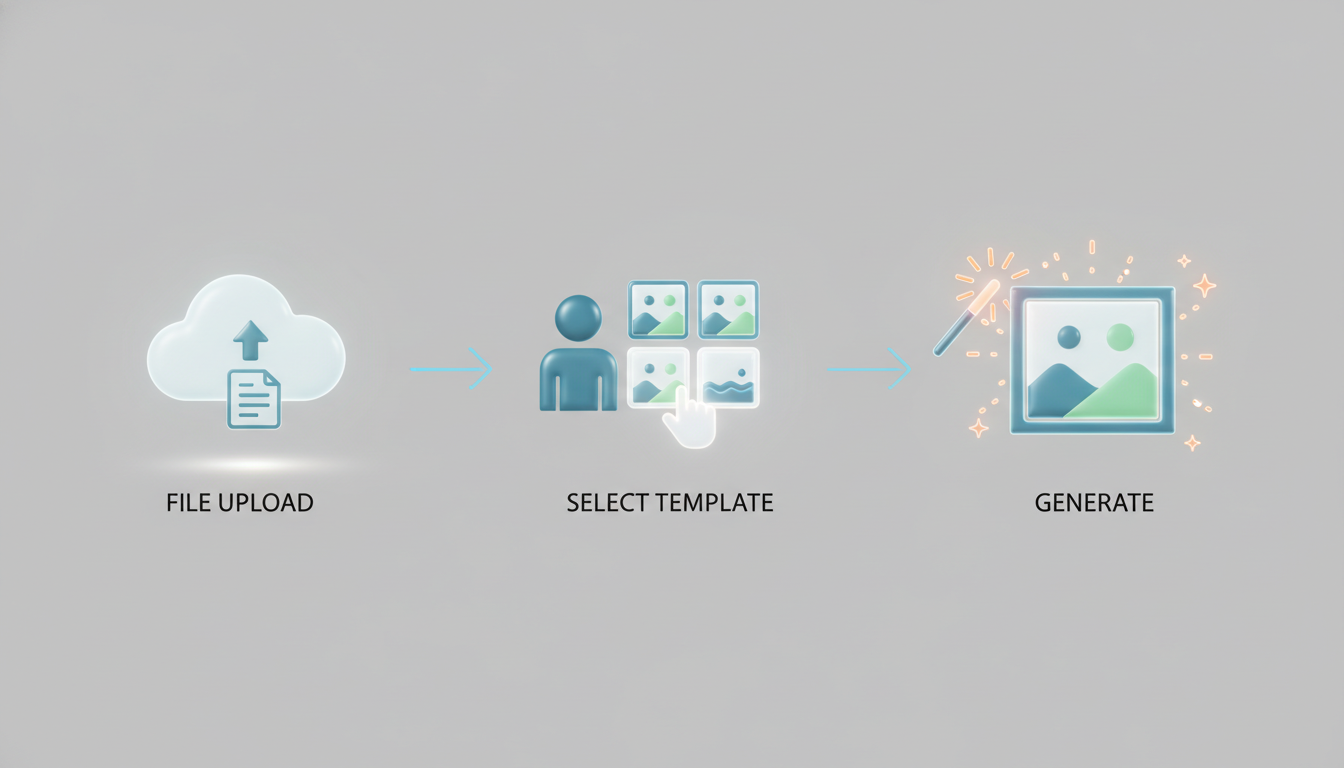
Here is the core difference: When you upload a product image and select a template, the AI doesn't just slap the image on top. It analyzes the geometry and texture of your product. It then regenerates the lighting and shadows to ensure the product looks like it was actually photographed in that environment.
Deep Dive: Core Selling Points of Haimeta’s AI Tool
Let’s explore the specific features that make this tool a superior choice for merchants, marketers, and content creators.
1. Zero Photoshop Skills Required
The barrier to entry for professional product photography has been obliterated. You do not need to know what a "layer mask" or a "gaussian blur" is. The interface is intuitive:
- Step 1: Upload your raw product image.
- Step 2: Choose the background template that fits your aesthetic.
- Step 3: Let the AI do the work.
It is truly a one-click solution. This democratization of design means that a small business owner can produce visuals that rival Fortune 500 companies.
2. Perfect Lighting and Shadows (The Secret Sauce)
As mentioned earlier, lighting is what sells the realism. Haimeta’s algorithms are trained to recognize where the product touches the "ground" of the new background. It automatically generates contact shadows (the dark areas right underneath the object) and cast shadows (the shadow stretching away from the light source).
If you choose a sunny outdoor template, the AI will brighten the highlights on your product to match the sun's intensity. If you choose a moody, dark interior, it will adjust the contrast accordingly. This dynamic adaptation is something that takes humans hours to perfect, but the AI does it in seconds.
3. The Power of Before & After
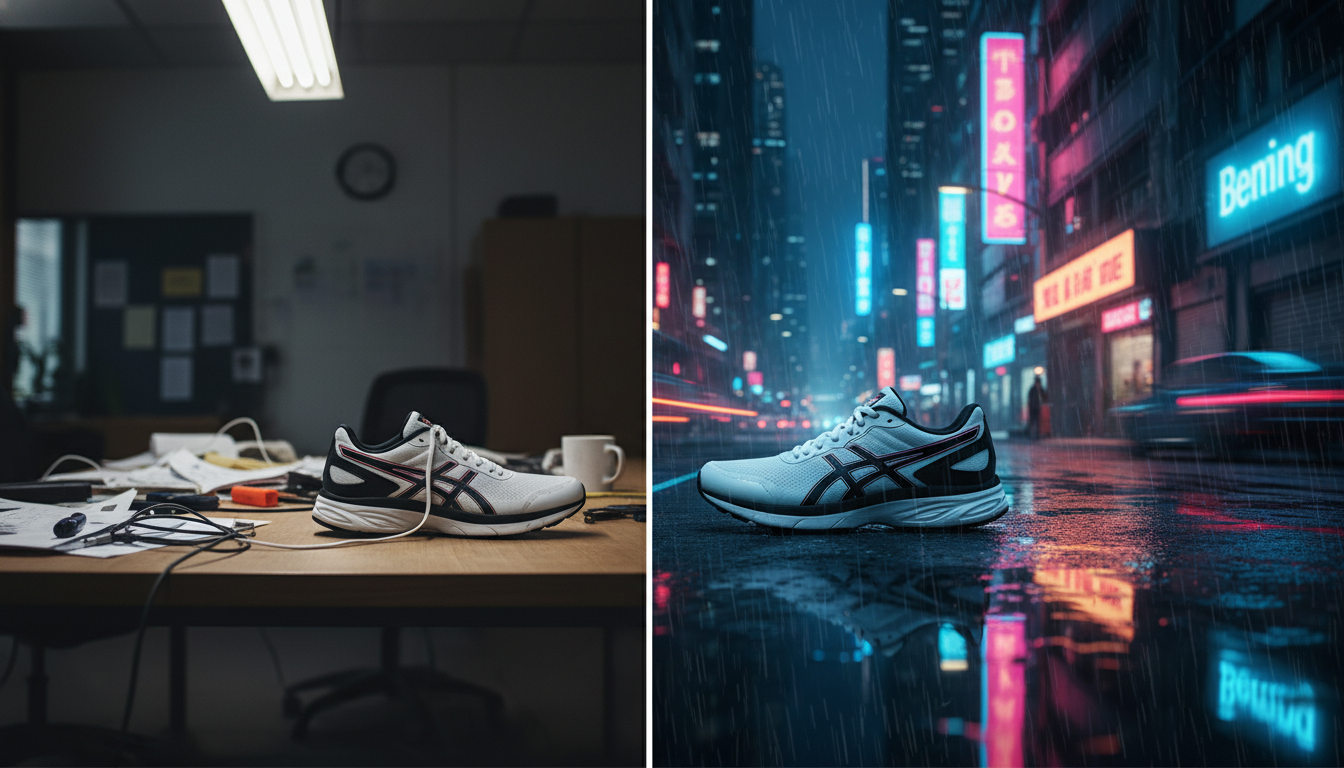
Visual transformation is powerful. Using Haimeta allows you to create compelling "Before & After" assets easily.
- Before: A plain sneaker on a dull grey background.
- After: The same sneaker splashing into a puddle on a neon-lit city street.
These transformations are vital for A/B testing in advertisements. You can test the same product against a luxury background, a nature background, and a minimalist background to see which one resonates most with your audience.
Comparison: Manual Editing vs. Haimeta AI
To make this decision easier, let’s look at a direct comparison of the two methodologies.
| Feature | Manual Photoshop Editing | Haimeta AI Tool |
|---|---|---|
| Speed | 30-60 minutes per image | Seconds per image |
| Skill Level | High (Professional training) | None (Beginner friendly) |
| Lighting | Manual adjustment required (prone to error) | Automated, context-aware lighting integration |
| Cost | High (Software subscription + Labor) | Low (Efficient tool usage) |
| Scalability | Low (Linear output) | High (Infinite variations instantly) |
| Creativity | Limited by stock photo availability | Unlimited template options |
How to Use the Product Change Background Tool
Ready to try it out? Here is a simple walkthrough to get you from a raw photo to a marketing-ready asset using the Product Change Background Tool created by Haimeta.
1. Preparation Ensure you have a relatively clear photo of your product. While the AI is powerful, starting with a high-resolution image ensures the final output is crisp.
2. Uploading Navigate to the tool. Drag and drop your image. The system immediately identifies the subject. You don't even need to manually select the object; the AI distinguishes between the product and the original background automatically.
3. Template Selection This is the fun part. What vibe are you going for?
- Selling skincare? Choose a marble countertop with water droplets and soft bathroom lighting.
- Selling camping gear? Choose a rugged forest floor or a mountain peak.
- Selling tech gadgets? Choose a sleek, abstract cyber-punk background.
4. Generation & Download Click generate. In moments, the AI processes the image, blending the pixels of your product with the pixels of the background. It adjusts the color temperature and casts the shadows. Once satisfied, download the high-resolution image ready for your website or Instagram.

Why This Matters for Your SEO and Conversion Rates
You might be wondering, "Does the background really matter that much?" The data says yes.
- Contextual Relevance: Customers are more likely to buy a product if they can visualize it in their lives. Seeing a coffee mug on a cozy wooden table next to a book triggers an emotional response that a white background does not.
- Brand Consistency: If your brand identity is "eco-friendly and organic," putting your products on natural backgrounds (leaves, wood, stone) reinforces that message instantly.
- Click-Through Rates (CTR): In a sea of white-background Amazon listings, a colorful, context-rich image stands out. Using the product change background technique effectively can increase your CTR on Google Shopping and social media ads significantly.
Conclusion: Embrace the Future of Product Photography
The landscape of digital marketing is shifting. Speed and quality are no longer mutually exclusive. With the advancements in generative AI, you no longer have to choose between saving money and having professional-grade imagery.
The Product Change Background Tool created by Haimeta offers a bridge to high-end visuals for everyone. Whether you are a dropshipper testing products, a handmade artisan on Etsy, or a marketing manager for a large brand, the ability to seamlessly change product backgrounds with perfect lighting integration is a superpower.
Stop struggling with complex selection tools and mismatched shadows. Upload your product, pick your scene, and let the AI handle the rest. Your products deserve to be seen in the best light possible.